

self-hosted homelab
a linux server running my own cloud (files, media, notes, passwords), rebuildable from a runbook.
linux · docker · cloudflare tunnel · tailscale · postgresql · minio · nextcloud · vaultwarden · sops/age
active, running continuously and fully documented.
A self-hosted Linux server that quietly runs the parts of my digital life I used to rent (file sync, my notes, a media and books library, a password manager), all on one old laptop I never intend to turn off. It reaches the internet through a Cloudflare Tunnel instead of open ports, keeps its secrets encrypted, and, more than any single service, it's reproducible. I can rebuild the whole machine from a runbook I wrote as I went. There's something quietly satisfying about owning the thing your whole digital life runs on, even, maybe especially, when it breaks.
why i built it
It started with something small and a little petty. I wanted to sync my Obsidian vault across my devices without paying the subscription fee. That one annoyance sent me looking for alternatives, and I stumbled into self-hosting, a WebDAV server of my own, with MinIO buckets holding all my notes. I had a spare laptop lying around doing nothing, so I turned it into a server, got the vault syncing, and then just… didn't stop.
Obsidian sync led to Pi-hole to kill ads across the network, which led to Nextcloud
for files, which led to Tailscale so I could reach any of it from anywhere.
Somewhere in there I fell down the rabbit hole of registering my own domain and
carving out subdomains for each service, so instead of memorising ports I could
visit drive. or books. and have it just load, from my phone, on cellular, with
everything still under my control. What began as dodging one subscription slowly
turned into buying back ownership of my whole setup, one service at a time.

Underneath it all was privacy and control (I liked knowing the data lived on hardware I could physically touch) and, honestly, curiosity. I wanted to actually understand Linux, Docker, and networking, and there's no faster way to learn than running real infrastructure you depend on. And because the whole thing grew out of my frustration with subscription fees, I wanted to document it well enough that anyone with the same itch could rebuild it and skip the fees too. The server earns its keep in quieter ways too. It's where my Spotify history-collecting pipeline runs on a schedule, night after night.
the thinking
A few decisions shaped how it grew up. I put everything behind a Cloudflare Tunnel instead of open ports, partly because my ISP sits behind CGNAT and inbound connections simply don't arrive, but mostly because I liked that nothing is left listening on the public internet at all. Tailscale handles the rest when I actually need to administer the box. Secrets go through SOPS + age, so the encrypted store can live right inside the vault and sync freely, and plaintext only ever exists for the moment I decrypt it.
But the decision I care about most wasn't technical. Early on I realised a homelab you can't rebuild isn't an asset, it's a fragile single point of failure you've grown to depend on. So I started treating every break as a documentation event. Whatever I did to fix it went straight into a rebuild runbook. It changed how the whole thing felt. A service going down stopped being a small panic and became a procedure I could follow, and that shift, from memory to procedure, is the part of this project I'm quietly proudest of.
how it works
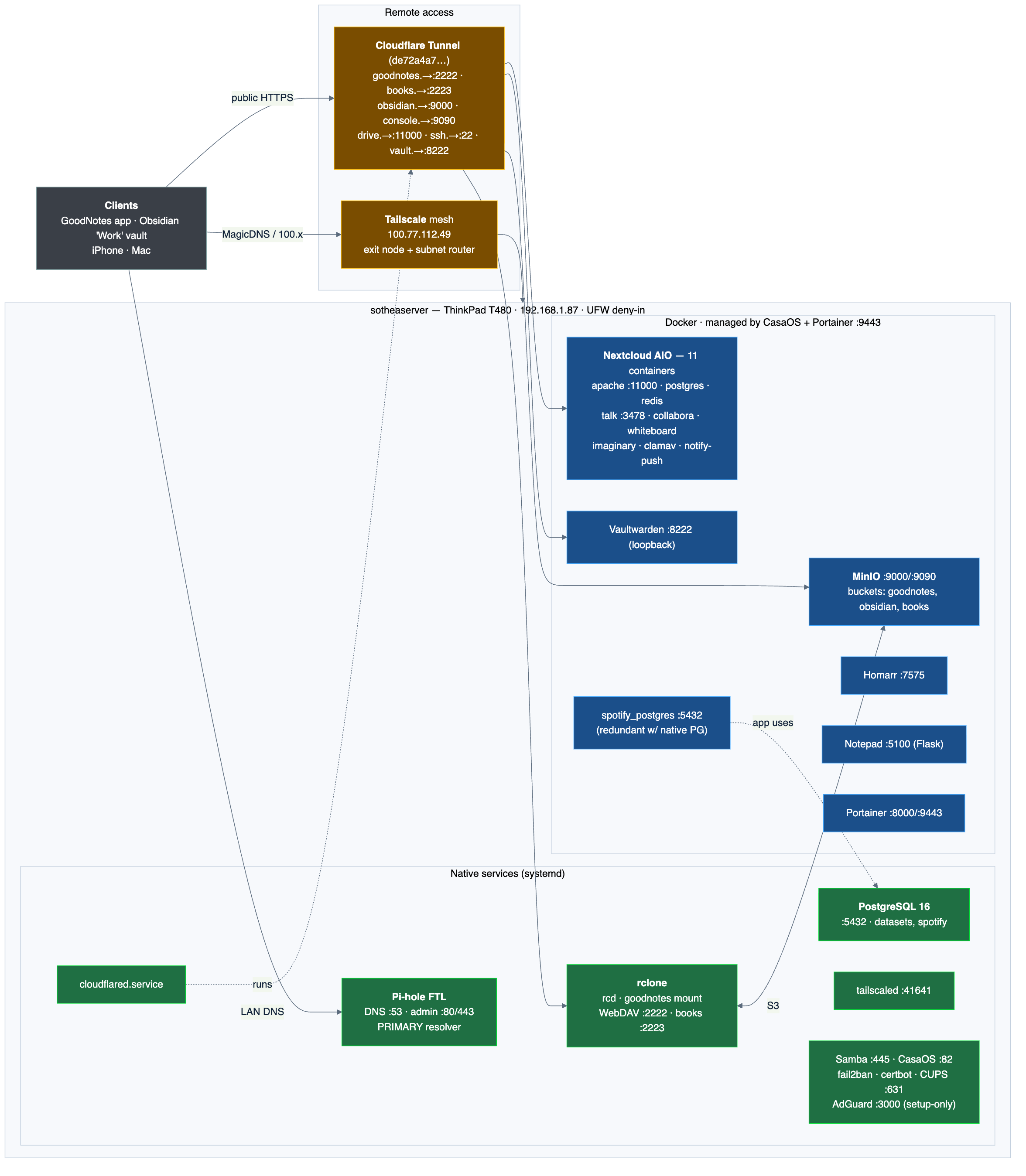
Three layers coexist on the metal. Native systemd services own the fundamentals,
Pi-hole for DNS and adblock, Samba for file shares, PostgreSQL, cloudflared for
the tunnel, Tailscale for remote access, and a few rclone WebDAV mounts. Docker
runs the applications, Nextcloud (files/drive), MinIO (S3-compatible object storage
that backs the Obsidian sync), Vaultwarden (passwords), and a books library served
over WebDAV, all managed through CasaOS and Portainer. Everything user-facing is
reached by a public hostname mapped through the tunnel's ingress rules
(drive. → Nextcloud, obsidian. → MinIO, and so on), so there's a clean split
between what runs and how it's reached. Full raw configs live in the
repo, and this page is the narrated version.
walkthrough
Reproducible from bare metal. Each stage is the goal, the shape of the work, and the sharp edge I hit.
1. the host
An old ThinkPad T480 acting as an always-on server, Ubuntu 24.04 LTS, 16 GB RAM, single SSD. Gotcha. it's a laptop, so set "do nothing on lid close" or it suspends the moment you shut it. A DHCP reservation pins its LAN IP so the tunnel and shares always find it.
2. networking and access
Pi-hole becomes the LAN resolver, and UFW closes everything that isn't needed.
Tailscale is the primary remote path, tailscale up --advertise-exit-node --advertise-routes=192.168.1.0/24 with ip_forward enabled, because it works
through CGNAT with no port-forward. Gotcha learned the hard way. fail2ban's sshd
jail bans your own IP after a few failed logins during setup.
3. the tunnel
Install cloudflared as a native service and define ingress in
/etc/cloudflared/config.yml, one hostname per local target. The gotcha that cost
me time. I also had a cloudflared Docker container running the same tunnel,
two runners fighting over one connection, crash-looping. Keep exactly one, and I
kept the native service.
4. services and storage
Bring up the Docker stacks (Nextcloud, MinIO, Vaultwarden, books WebDAV) and wire the Obsidian vault to sync against a MinIO bucket. Storage is a single disk with no redundancy, so off-box backups are the only safety net, a constraint written down rather than wished away.
5. secrets
Real values live in a SOPS-encrypted *.sops.yaml (AES-256 via age), safe to
sync into the vault. Decrypt with sops -d using the age key at
~/.config/sops/age/keys.txt, which exists only on the Mac, so backing up that
one key is the real disaster-recovery dependency.
verify
You know it's up when dig @192.168.1.87 resolves through Pi-hole, the tunnel
hostnames load their apps from off the LAN (proving no port-forward is involved),
Tailscale reaches the box over cellular, and sops -d round-trips the secret store.
what i learned
The biggest surprise was how little of "infrastructure" is actually the services, those were the easy, fun part. The real work, and the real value, was the bookkeeping. Writing down the storage layout, the tunnel config, the backup steps, and every sharp edge as I hit it, so that a future me (probably tired, probably at a bad time) could rebuild the machine without having to remember anything. It taught me that documentation isn't the boring chore after the project. For something you actually depend on, it is the project.
It's not perfect, and I try to be honest about that. It's a single aging disk with no redundancy, so off-box backups are the only real safety net, and there are a couple of half-finished cleanups I've flagged and not gotten to. But I can genuinely rebuild the whole thing from my own notes, and it's been quietly running my digital life for long enough that I mostly forget it's there, which, for a server, is the highest praise I've got.